
Summary
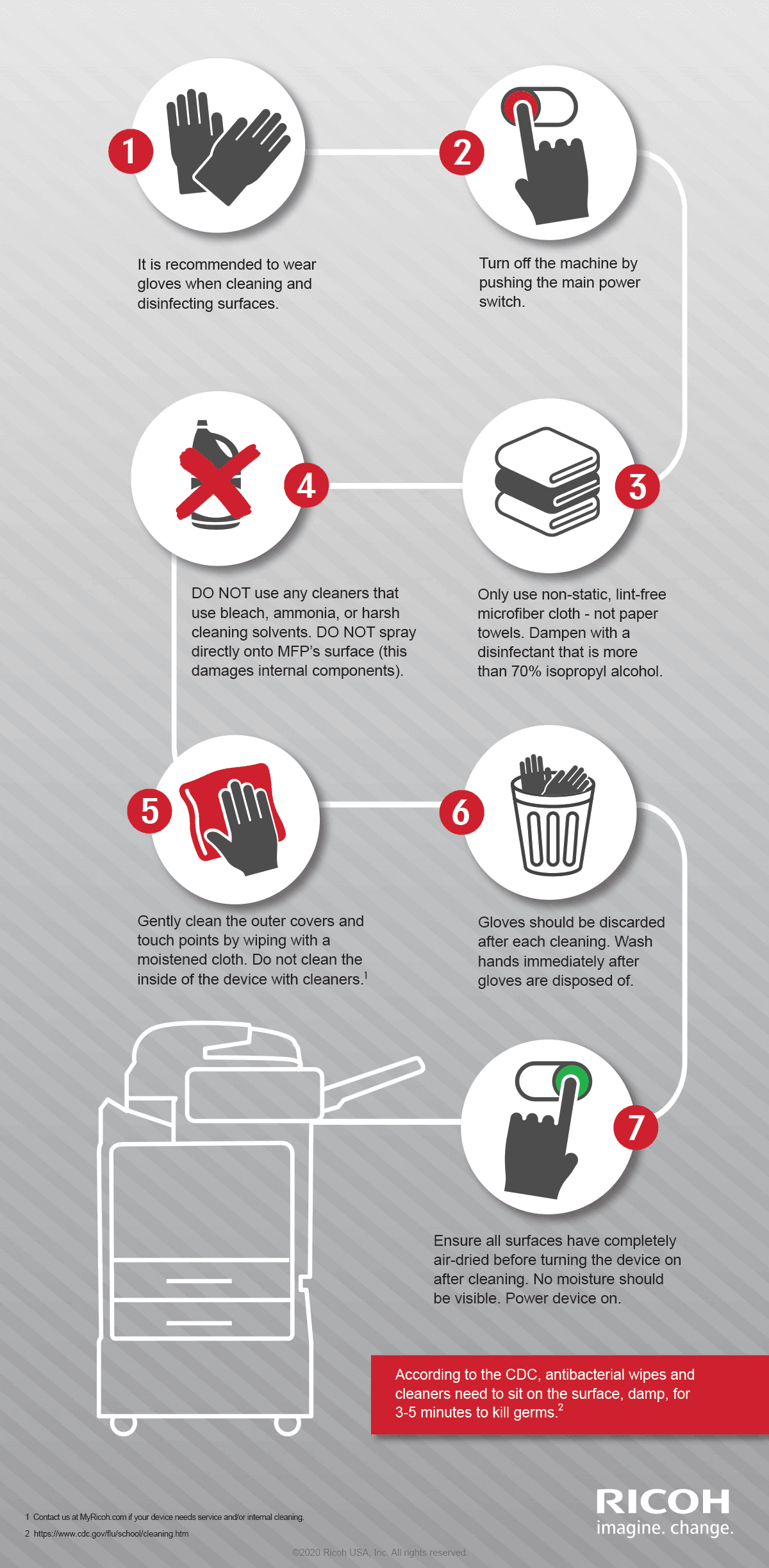
Here are the best practices for cleaning your Ricoh MFP.
Read time: 3 minutes
As many people often share a multifunction printer, it should be cleaned, and its surfaces sterilized. Touchscreens and operation panels get dirty – it just happens. Fortunately, cleaning your device is simple. This article will answer the most common questions. If you have other questions, please contact us.
Of course, you can also use your MFP, without touching the screen...
Recommended for you
 Articles
Best practices for cleaning your Ricoh IFPD
Learn the best practices for cleaning and disinfecting your interactive flat panel display (IFPD), including what cleaners to use and what to avoid.
 Case Studies
$1.21 million savings, year 1
See how we helped reduce print by 80%, roll-out a print anywhere environment, right-size printers, reduce vendors, and create big savings.
 Articles
Sustainability shortlist
Ricoh's sustainability strategy put us in the leader category in the IDC MarketScape: Worldwide Sustainability Programs and Services Hardcopy 2023 Vendor Assessment. See why.
- 1. https://www.cdc.gov/flu/school/cleaning.htm